Sudoku
Fill the 9x9 grid so every row, column and box contains each digit from 1 to 9.
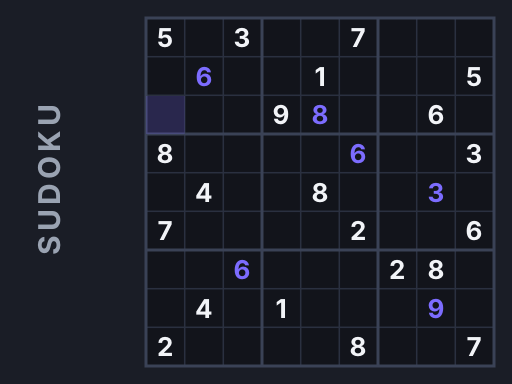
Sudoku · Puzzle
🎮You May Also Like


About Sudoku
Sudoku is a pure logic puzzle. You are given a 9×9 grid with some digits already filled in, and your job is to complete it so that every row, every column and every 3×3 box contains each digit from 1 to 9 exactly once. No arithmetic is involved and nothing is ever a guess — every square can be worked out from what is already on the board.
Puzzles here are generated fresh each time you press New, and every one is checked to have exactly one solution before it is handed to you. That check matters more than it sounds: a puzzle with two valid answers can be finished by guessing, which defeats the point. Four difficulty levels change how many digits are removed — 40 blanks on Easy up to 58 on Expert — and how deep you have to reason to make progress.
How to Play Sudoku
- Choose a difficulty: Easy, Medium, Hard or Expert. Harder levels start with fewer given digits, so the first move takes longer to find.
- Click or tap an empty square to select it. The row, column and box you are working in are highlighted, and every other copy of the same digit lights up in amber.
- Enter a digit from the number pad below the grid or from your keyboard. A wrong digit turns red and adds to your mistake counter, but it does not end the game — you can correct it.
- Turn on Notes to pencil in candidates instead of committing. When you later place a digit for real, that candidate is cleared automatically from the rest of its row, column and box.
- The puzzle completes the moment every square matches the solution. Your best time is recorded per difficulty, but only for a run with zero mistakes.
Controls
Desktop: click a square to select it, then press 1–9 to enter a digit. Backspace or Delete clears the square. N toggles notes mode. The ← ↑ ↓ → arrow keys move the selection, which is much faster than reaching for the mouse between entries.
Mobile and tablet: tap a square, then tap a number on the pad below the grid. The Notes, Erase and New buttons sit under the pad. Tapping the same number twice clears the square, so you do not need to switch to Erase for a quick correction.
Digits that already appear nine times on the board grey out on the number pad — a small cue that saves you scanning the grid to check.
Tips and Tricks
- Scan for the most constrained square, not the emptiest region. Look for a row, column or box that already has six or seven digits; the remaining squares there usually resolve immediately.
- Use notes early on Hard and Expert. Trying to hold five candidates per square in your head is where most people stall. Pencil them in and patterns appear on their own.
- Look for a digit that fits only one square in a box, rather than a square that accepts only one digit. Beginners only do the second; the first finds moves the second misses.
- Never guess. Every puzzle here has one solution, so if you cannot see the next move it exists and you have not found it yet. Guessing turns a solvable board into an unrecoverable mess.
- Chase the amber highlight. Selecting a filled square lights every other copy of that digit, which makes it obvious where the remaining ones can and cannot go.
Frequently Asked Questions
Does every puzzle have only one solution?
Yes. After removing digits the generator verifies the remaining grid still has exactly one valid completion. If removing a digit would create a second solution, that digit is put back.
Do mistakes end the game?
No. A wrong digit shows in red and increases the mistake counter, but you can fix it and keep going. Only a completely mistake-free run counts toward your best time.
What is the difference between the difficulty levels?
Easy leaves 41 digits on the board, Medium 33, Hard 27 and Expert 23. Fewer givens means you have to chain more steps of reasoning before a square resolves.
How do pencil notes work?
Toggle Notes, then tap digits to add or remove them as small candidates in the selected square. When you place a real digit, that candidate is removed automatically from the rest of its row, column and box.
Is my progress saved if I close the tab?
The current puzzle is not saved, but your best time for each difficulty is stored in your browser.
Last updated 2026-09-08 · More Puzzle games